
For Rust server owners
See your Rust server in 3D, and run it from the map.
Your real world in 3D, admin actions from the map, anti-cheat evidence and a manager for plugins and wipes, on Oxide or Carbon.
Free during early access. One small plugin for Oxide or Carbon; it loads without a restart.
Your real world in 3D
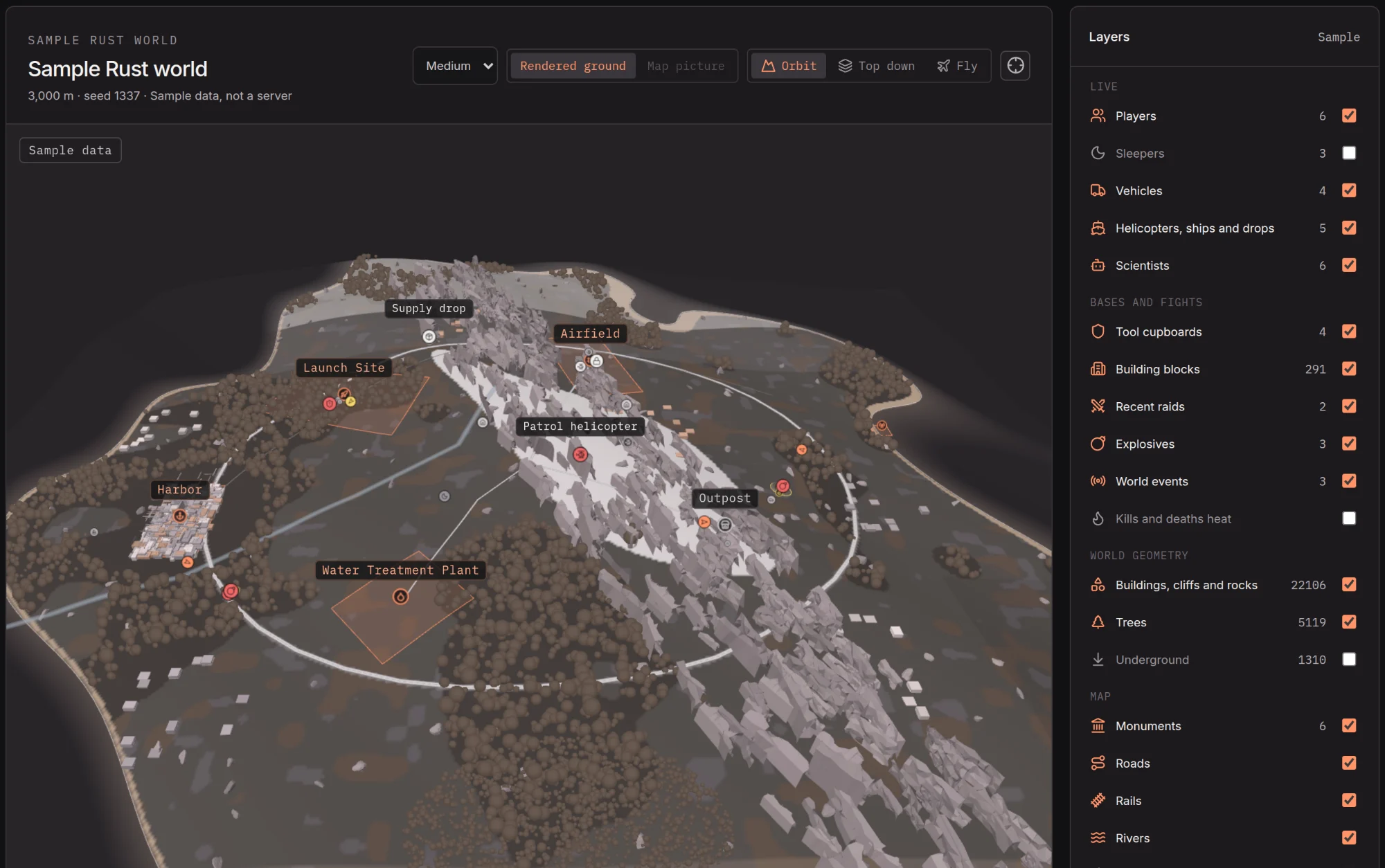
The 3D map draws your server's own world: every monument, building, cliff, rock and tree in its true shape, on ground coloured from the map's sand, snow, grass and forest. The shapes come from your own server, sent once per map and spread over many frames; nothing from Rust's files ships with Highwatch.
- Bases block by block in twig, wood, stone, metal and armored, with a ring on each tool cupboard coloured by upkeep. Click one for the owner, authorised players, storeys, doors and who is asleep inside.
- Live events: the cargo ship, patrol helicopter, Bradley, Chinook, airdrops, hackable crates and the travelling vendor move every five seconds, each in its own shape, and the side panel says what each is doing.
- Scientists and Rust's other AI people, raids and explosives from the last six hours, and layers for roads, rails, rivers, power lines, monuments and Rust's grid.
- Controls: orbit, top down or fly, follow a player, jump to a grid square such as D12, and replay the last hour. Low, Medium and High quality for older graphics cards.
The 2D map draws the plugin's map picture with monument names.
Admin from the map
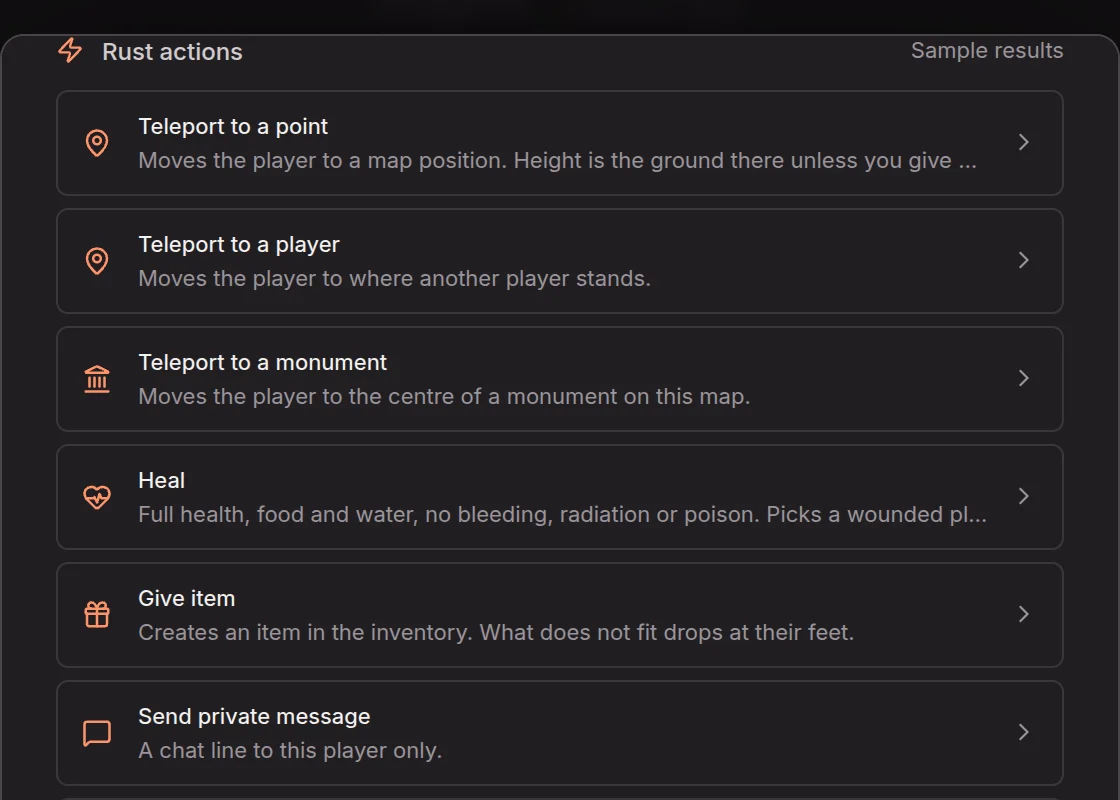
A Rust player's dialog, or a player on the map, can teleport to a point, a player or a monument, heal, kill, give an item, message, kick, ban, temporary ban and unban. Click a point on the 3D map to teleport someone there, drop an airdrop or send the patrol helicopter. Broadcast, call the cargo ship or run a console command for the whole server.
Every action asks to confirm and shows the server's result, usually within a second or two. Commands start off on a new server; only an owner turns them on in Settings, Connections, and that change is in the staff log. Clearing a tool cupboard and the console need the owner role. Bans go to Rust's own ban list, so they hold even if the plugin is removed.
Plugins, wipes and updates with the Server Manager
On a Windows PC you control, the Server Manager makes a new Rust server or imports one you have, installs Rust with Oxide or Carbon, starts and restarts it with a countdown, keeps it updated and links it to Highwatch with the plugin in place.
- Plugins: browse uMod (about 1,400 plugins) and Codefling (about 2,900) in one list, install a batch of uMod plugins in one click, edit configs with a JSON check and a backup, and roll back. Codefling plugins open on Codefling; most are paid, so Highwatch never downloads them.
- Wipes: map, blueprint or both, by hand, on your schedule or with the forced wipe (first Thursday, 19:00 London), with the next map chosen per wipe.
- Update hold: a Rust update Oxide or Carbon has not caught up with waits, so your plugins keep working. Update anyway installs it at once.
- server.cfg as a form, owners and moderators by SteamID64, and the public, staging or aux01 branch.
Anti-cheat evidence and reports
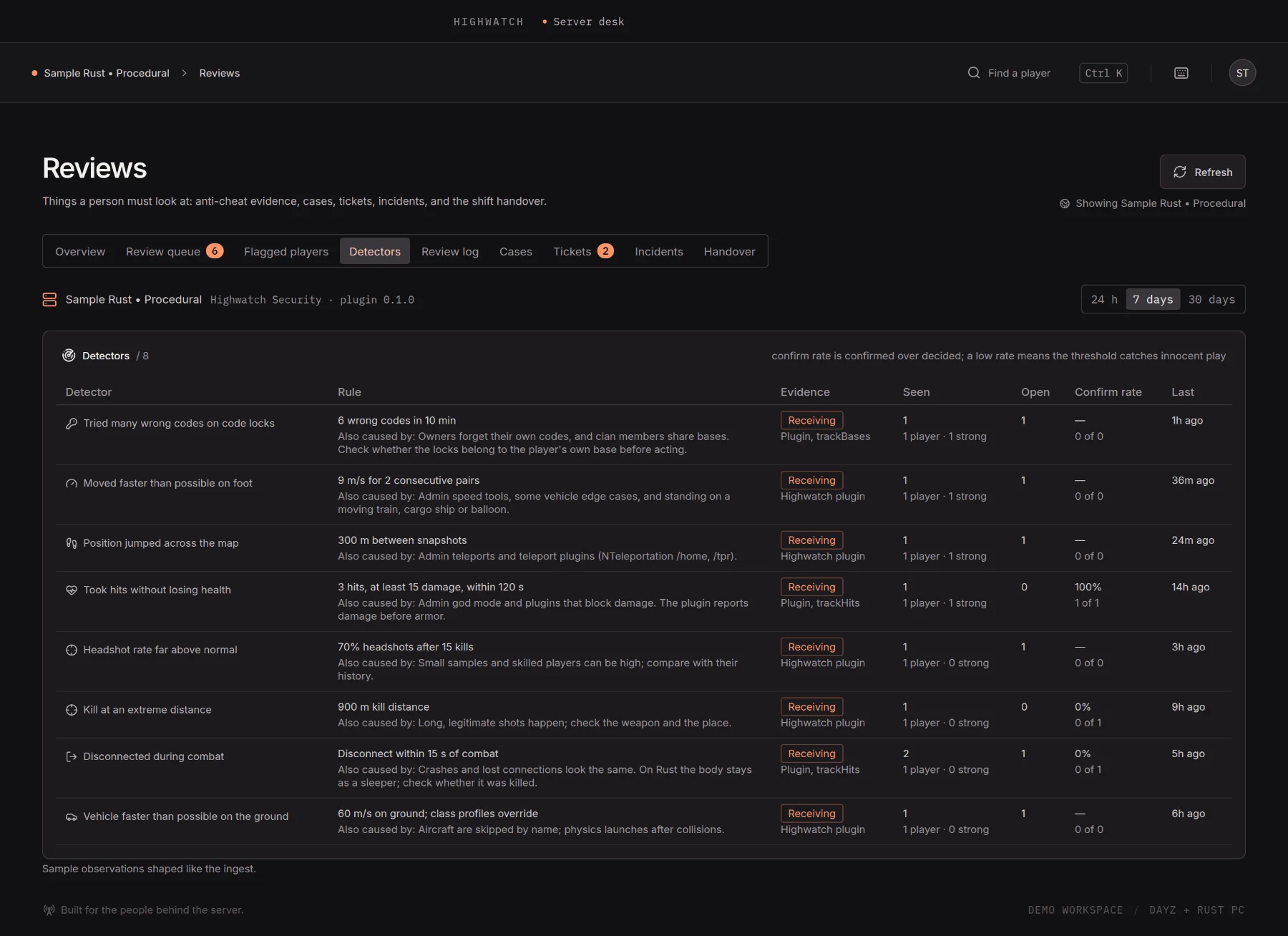
A Rust server runs the eight detectors its plugin can feed: code lock guessing, speed on foot, teleports, no-damage hits, headshot rate, kill distance, combat logging and vehicle speed. Each observation keeps its evidence and the everyday reasons it can fire, such as admin tools or teleport plugins. Highwatch never kicks or bans; your staff decide.
F7 reports, antihack hits, raids, explosives and code lock entries land in one timeline and in each player's record, with Rust hours on the Steam account check. How the detectors work
What it reads
- Players: position, health, hunger and thirst, what they hold, vehicles and ping. Reports, antihack hits and explosives used count in each player record.
- Activity: joins and leaves, kills and deaths with the cause in plain words, hits, chat, building and upgrades, raids on bases, code lock entries, tool cupboard changes, F7 reports, antihack hits, kicks, bans and world events. A code lock code is never sent.
- Performance: server FPS, frame time, sleepers, memory, entities and garbage collection, plus how much time every loaded plugin spends in its hooks.
- World: tool cupboards with grid square, owner, authorised players and upkeep, decaying first.
Pages, panels and settings follow the server's game: Rust charts, only the detectors a Rust server can trigger, Rust hours on the Steam account check, and Discord routes and alert rules that list Rust's own events.
The Highwatch plugin
Add your server asks which game the server runs. Pick Rust and Highwatch makes the server's key and saves the plugin, Highwatch.cs, and its config, key already inside, to your Downloads folder. Copy the config into oxide/config and the plugin into oxide/plugins (on Carbon, carbon/configs and carbon/plugins). It compiles straight away, with no restart and no launch line, and the pairing confirms as soon as the plugin posts.
Type highwatch.status in the server console or RCON to see whether the plugin is posting and when it last succeeded. It never prints the key.
Not affiliated
Screenshots show the app's labelled sample data, including a sample Rust world. Rust is a trademark of Facepunch Studios. Highwatch is an independent tool and is not affiliated with Facepunch Studios, uMod or Codefling.
Read next

Get Highwatch while it is free.
Early access is free. Join the Discord, open a ticket, and your access key arrives in the ticket.
Join early access