
Staff actions
See what your staff do with admin tools.
Every action taken with COT, VPP Admin Tools or LBmaster Admin Tools, kept for the server owner, with flags for the patterns worth a second look.
What the owner sees
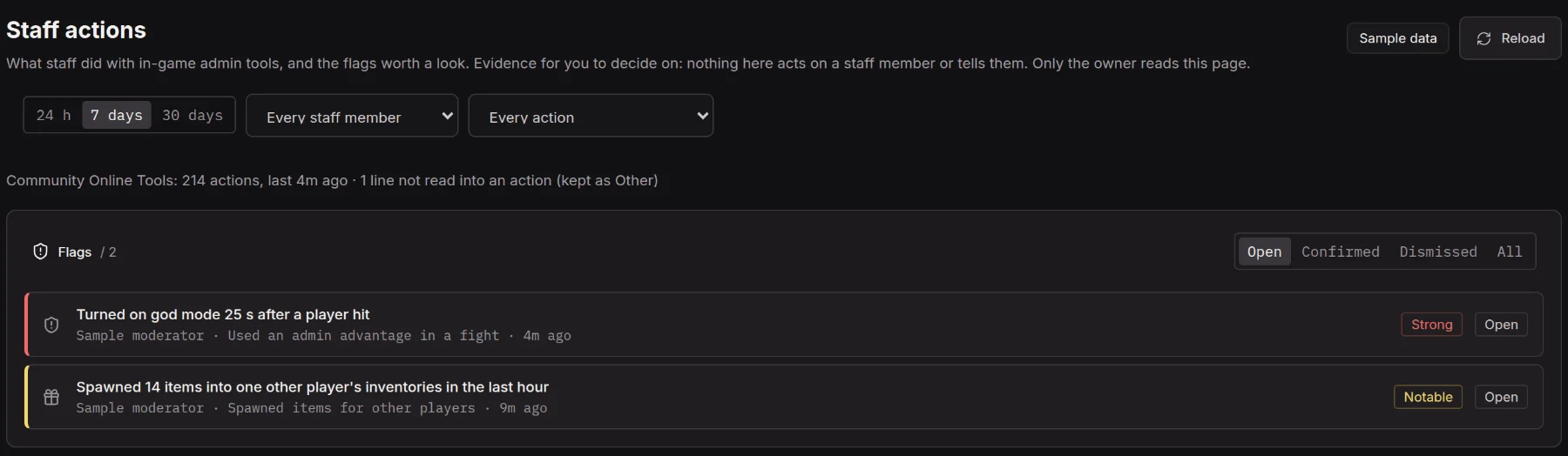
Reviews, Staff actions has a table per staff member (spawns, weapons, items given to other players, teleports, objects removed, ESP and free camera time, open flags) and the full action log with the tool's own line beside each action. Filter by 24 hours, 7 or 30 days, staff member and action.
Flags, never actions
Highwatch flags many items or weapons spawned in an hour, items spawned for other players, many teleports, long ESP or free camera use, god mode or a self heal right after a fight, many objects removed, and every permission change. Each flag shows the evidence and the everyday reasons it can happen. Confirm or dismiss it with a private note.
Highwatch never kicks, bans, removes a permission or tells the staff member. A count rule flags someone once per window, and once more if it becomes strong, so a long ESP session is one flag, not one a minute.
Private by design
Only the server owner reads Staff actions. Staff and moderators never see it, the raw lines stay out of their Activity and player histories, and when the owner reviews a flag the staff log says only that a review happened. An AI agent account cannot read it either.
Setting it up
Load the add-on for the admin tool you run, on the server only, beside @Highwatch:
- Community Online Tools:
-serverMod=@Highwatch;@Highwatch-CF;@Highwatch-COT - VPP Admin Tools:
-serverMod=@Highwatch;@Highwatch-VPP - LBmaster Admin Tools:
-serverMod=@Highwatch;@Highwatch-LBAdmin
All three are on the Steam Workshop and in Control's server files. Each only watches and changes nothing the tool does. They need mod 0.20.0 and ingest 0.26.0 or later.
Read next

Get Highwatch while it is free.
Early access is free. Join the Discord, open a ticket, and your access key arrives in the ticket.
Join early access